
Monitoring OpenSSF Scorecard at Scale
The OpenSSF Scorecard project gives us an automated way to assess the security posture of a repository, but a one-off score isn’t very useful on its own. What you actually want is continuous monitoring across many repos, with visibility into what’s changing and what’s missing.
Here’s the tooling I’ve been playing with for an open source project.
Scorecard Monitor
Scorecard Monitor (demo video) is the core of the setup. You define the repos you care about in a scope.json, and the monitor stores each score and surfaces the score delta — the difference from the previous run — so you can see whether your posture is improving or regressing over time.
It also has a discovery mode that includes remediation links pointing to StepSecurity, which makes it easier to act on findings rather than just read them.
Scorecard Visualizer
For inspecting results, the Scorecard Visualizer renders scores as a webpage and supports data comparison between two commits. For example, you can compare two states of a repo directly: See an example comparison for the Node.js repo
This gives you a readable, web-based view of the differences instead of raw JSON.
Allstar
Allstar is highly configurable, with three main levels of control at the org level. Organization administrators can enable Allstar on:
- all repositories in the org;
- most repositories, except some that are opted out;
- just a few repositories that are opted in.
Useful references: an example scorecard.yaml
and the Allstar issues tracker.
Running Across Multiple Repos
For a multi-repo run, multi-scorecard (Go) lets you batch the work. The key insight is that the monitor can tell you what’s missing, not just what the current score is — and because it runs on a cron schedule, you get this on a recurring basis automatically.
The practical pattern: put the workflow YAML in a central repo so all your scoring is managed in one place.
I chose Scorecard Monitor because it has the discovery mode and issue generation features I wanted.
To implement it, I created a GitHub Actions workflow that runs weekly and generates issues for any failing checks. Here’s the workflow YAML:
name: "OpenSSF Scoring"
on:
  schedule:
    - cron: "0 0 * * 0"   # every Sunday at midnight
  workflow_dispatch:        # allow manual runs

permissions:
  contents: write
  issues: write
  pull-requests: none
  packages: none

jobs:
  security-scoring:
    runs-on: ubuntu-latest
    steps:
      - uses: actions/checkout@v4
      - name: OpenSSF Scorecard Monitor
        uses: ossf/scorecard-monitor@v2.0.0-beta8
        with:
          scope: reporting/scope.json
          database: reporting/database.json
          report: reporting/report.md
          auto-commit: true
          auto-push: true
          generate-issue: true
          github-token: ${{ secrets.GITHUB_TOKEN }}
          discovery-enabled: true
          discovery-orgs: '# Your organization name here'
Seeing Your Own Results
Once this is wired up, your repos show up in the public Scorecard viewer. For example, open source project scorecard can be seen here: wallet-provider repo is tracked here.
StepSecurity is handy for quickly checking which Scorecard checks pass or fail, though I’ve found its customization options somewhat lacking when you need more tailored remediation.
You can also add a score badge to the repo’s README:
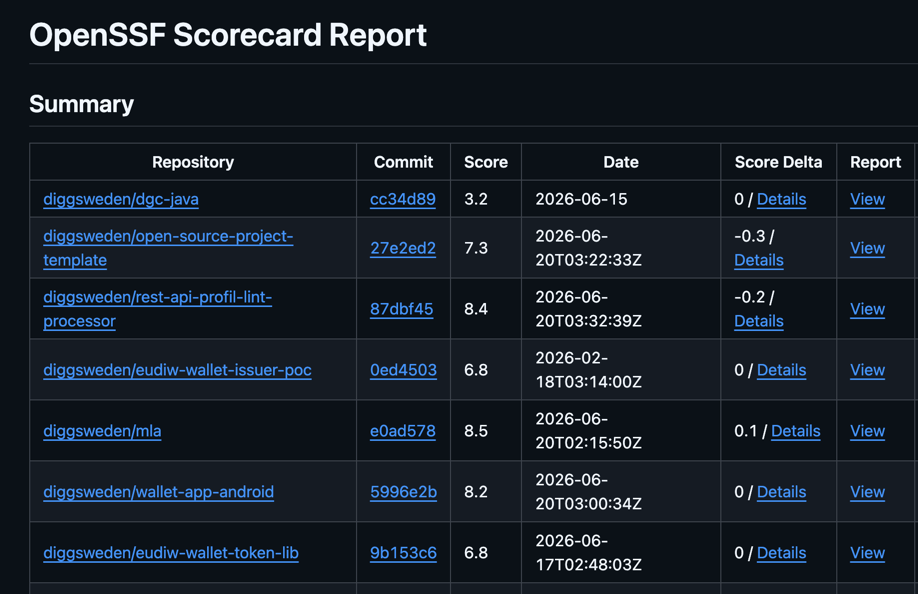
The monitor also generates an org-level report. Here’s an example report from the setup I ran.
Overall, this stack gives you a low-maintenance way to keep an eye on security posture across an org — the cron job does the heavy lifting, and the issue generation means nothing gets lost in a JSON file nobody reads.