
Istio mTLS
Here’s some notes I took while learning about Istio mTLS Some sources from cloudflare and partially from linux foundation training.
Once workloads have a strong identity, we can use them at runtime to do mutual TLS authentication (mTLS).
Traditionally, TLS is done one way. Let’s take the example of going to https://google.com. If you navigate to the page, you will notice the lock icon, and you can click on it to get the certificate details. However, we did not give any proof of identity to google.com, we just opened the website. This is where mTLS is fundamentally different.
When two services try to communicate using mTLS, it’s required that both of them provide certificates to each other. That way, both parties know the identity of who they are talking to.

Using mTLS both client and server verify each others’ identities
As we already learned, all communication between workloads goes through the Envoy proxies. When a workload sends a request to another, Istio re-routes the traffic to the sidecar Envoy proxy, regardless of whether mTLS or plain text communication is used.
In the case of mTLS, once the mTLS connection is established, the request is forwarded from the client Envoy proxy to the server-side Envoy proxy. Then, the sidecar Envoy starts an mTLS handshake with the server-side Envoy. The workloads themselves aren’t performing the mTLS handshake - it’s the Envoy proxies doing the work.
During the handshake, the caller does a secure naming check to verify the service account in the server certificate is authorized to run the target service. After the authorization on the server-side, the sidecar forwards the traffic to the workload.
The sidecars are involved in intercepting the incoming inbound traffic and facilitating or sending the outbound traffic. For that reason, two distinct resources control the inbound and outbound traffic. The PeerAuthentication for inbound traffic and the DestinationRule for outbound traffic.

PeerAuthentication is used to configure mTLS settings for inbound traffic, and DestinationRule for configuring TLS settings for outbound traffic
so lets start
first a gateway
apiVersion: networking.istio.io/v1beta1
kind: Gateway
metadata:
  name: gateway
spec:
  selector:
    istio: ingressgateway
  servers:
    - port:
        number: 80
        name: http
        protocol: HTTP
      hosts:
        - '*'
second disable the istio injection by changing the namespace label. adding a -
kubectl label namespace default istio-injection-
namespace/default labeled
third a frontend service (this means this one has no istio-injection)
apiVersion: apps/v1
kind: Deployment
metadata:
name: web-frontend
labels:
app: web-frontend
spec:
replicas: 1
selector:
matchLabels:
app: web-frontend
template:
metadata:
labels:
app: web-frontend
version: v1
spec:
containers:
- image: gcr.io/tetratelabs/web-frontend:1.0.0
imagePullPolicy: Always
name: web
ports:
- containerPort: 8080
env:
- name: CUSTOMER_SERVICE_URL
value: 'http://customers.default.svc.cluster.local'
---
kind: Service
apiVersion: v1
metadata:
name: web-frontend
labels:
app: web-frontend
spec:
selector:
app: web-frontend
ports:
- port: 80
name: http
targetPort: 8080
---
apiVersion: networking.istio.io/v1beta1
kind: VirtualService
metadata:
name: web-frontend
spec:
hosts:
- '*'
gateways:
- gateway
http:
- route:
- destination:
host: web-frontend.default.svc.cluster.local
port:
number: 80
we should get the pods up and running
kubectl get po
NAME                          READY  STATUS   RESTARTS  AGE
web-frontend-659f65f49-cbhvl  1/1    Running  0         7m31s
fourth reenable the injection
kubectl label namespace default istio-injection=enabled
namespace/default labeled
injection happens during pod creation so this we should be aware
fifth a customer-v1 deployment (this means this one has istio-injection)
apiVersion: apps/v1
kind: Deployment
metadata:
  name: customers-v1
  labels:
    app: customers
    version: v1
spec:
  replicas: 1
  selector:
    matchLabels:
      app: customers
      version: v1
  template:
    metadata:
      labels:
        app: customers
        version: v1
    spec:
     containers:
      - image: gcr.io/tetratelabs/customers:1.0.0
        imagePullPolicy: Always
        name: svc
        ports:
          - containerPort: 3000
---
kind: Service
apiVersion: v1
metadata:
  name: customers
  labels:
    app: customers
spec:
  selector:
    app: customers
  ports:
    - port: 80
      name: http
      targetPort: 3000
---
apiVersion: networking.istio.io/v1beta1
kind: VirtualService
metadata:
  name: customers
spec:
  hosts:
    - 'customers.default.svc.cluster.local'
  http:
    - route:
        - destination:
            host: customers.default.svc.cluster.local
            port:
             number: 80
so when we get po
kubectl get po
NAME                           READY  STATUS   RESTARTS  AGE
customers-v1-7857944975-qrqsz  2/2    Running  0         4m1s
web-frontend-659f65f49-cbhvl   1/1    Running  0         13m
MTLS Modes
permission mode
export GATEWAY_IP=$(kubectl get svc -n istio-system istio-ingressgateway -ojsonpath='{.status.loadBalancer.ingress[0].ip}')
if we navigate to $GATEWAY_IP now, we’ll get through with plain text traffic permission allows it if the service has no proxy. The proxy here being the istio-proxy, we didn’t set for the customer-v1
kiali will show this
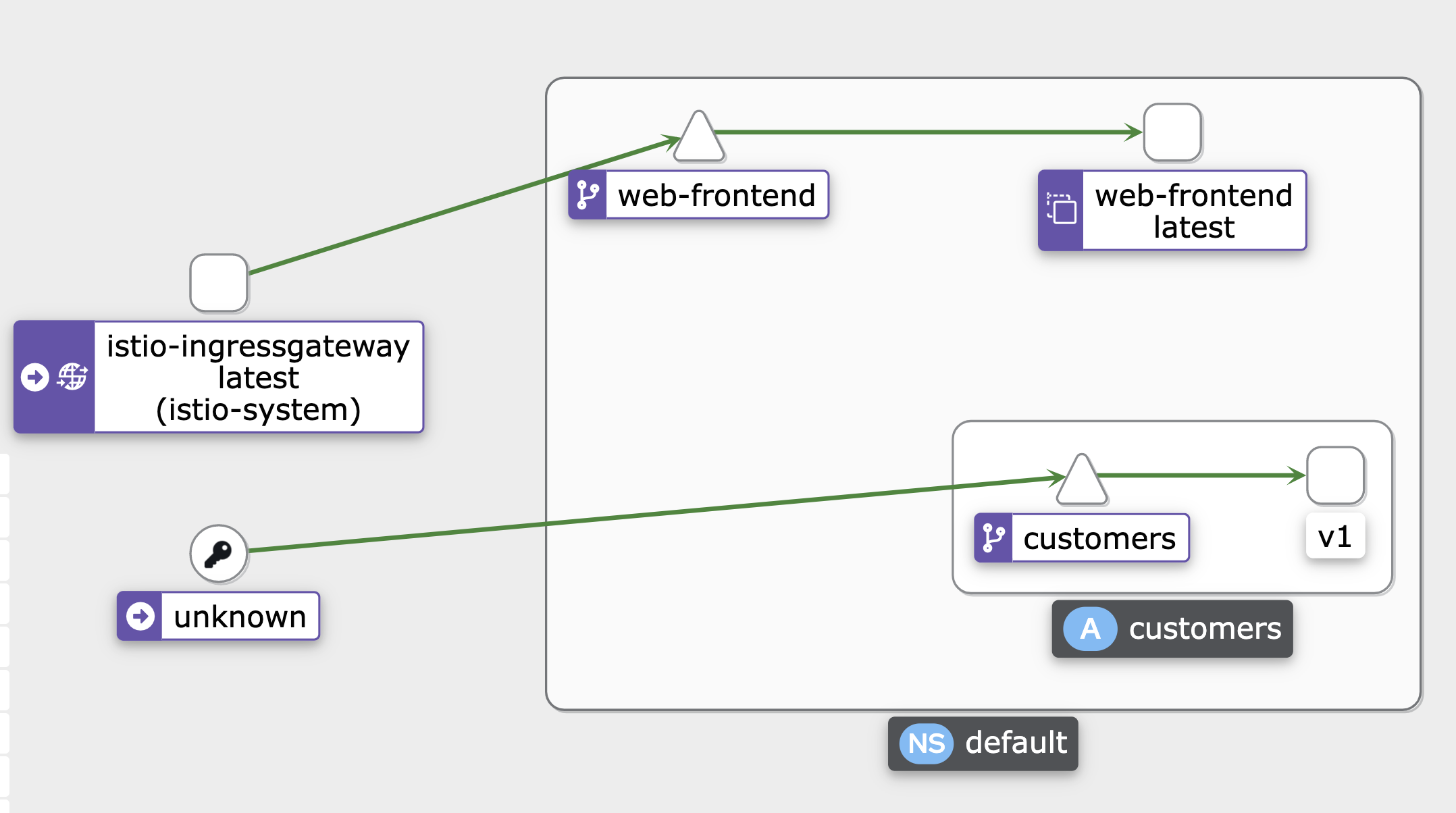 no proxy injected so it says “unknown”
then connect the customer to gateway
apiVersion: networking.istio.io/v1beta1
kind: VirtualService
metadata:
  name: customers
spec:
  hosts:
    - 'customers.default.svc.cluster.local'
  gateways:
    - gateway
  http:
    - route:
        - destination:
            host: customers.default.svc.cluster.local
            port:
              number: 80
curl the host should work
curl -H "Host: customers.default.svc.cluster.local" http://$GATEWAY_IP
generate traffic towards the host
while true; do curl -H "Host: customers.default.svc.cluster.local" http://$GATEWAY_IP; done
and towards the service
while true; do curl http://$GATEWAY_IP; done
kiali will show
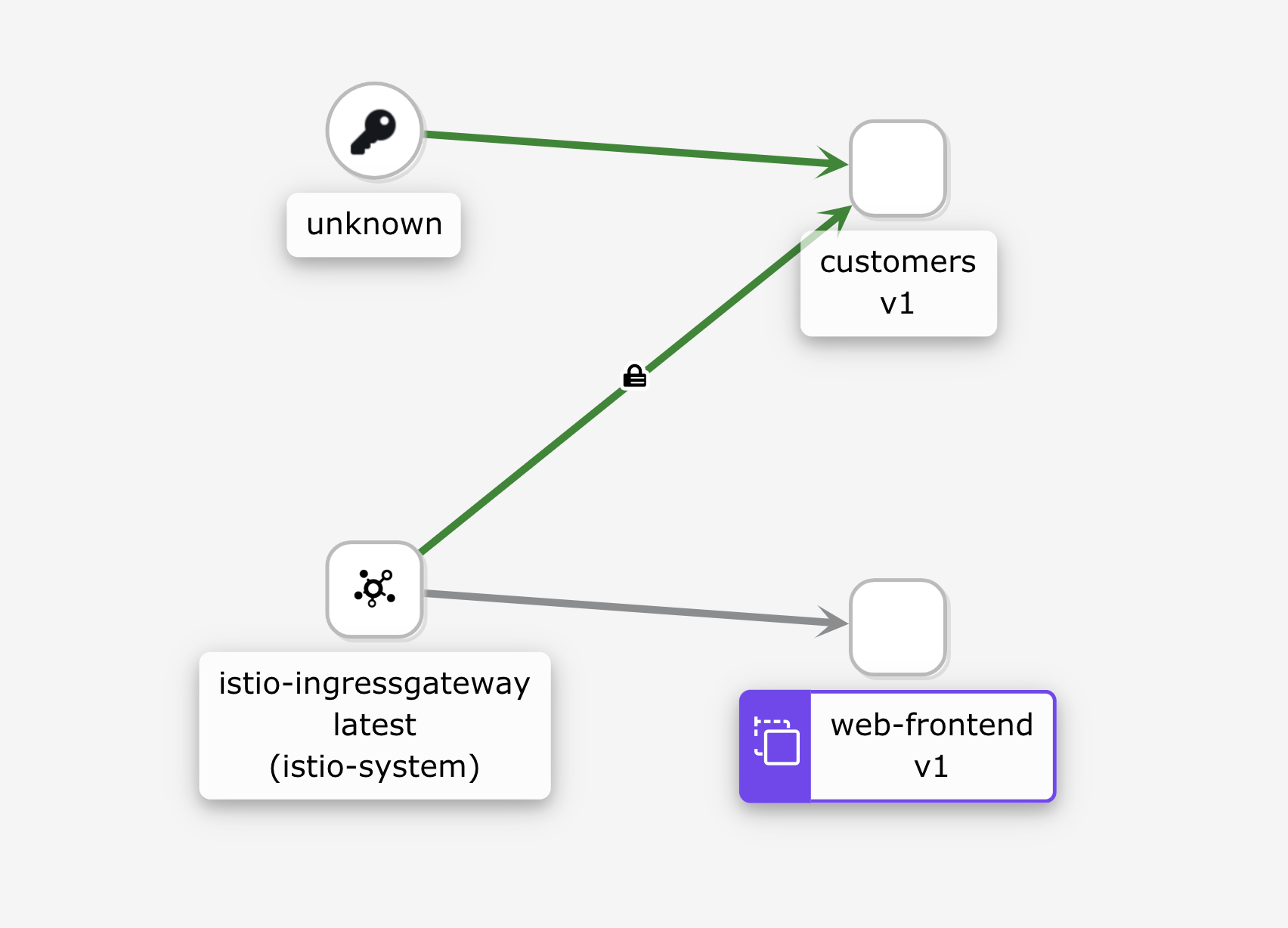 MTLS (notice padlock) for the traffic towards customers-v1
not for web-frontend (without MTLS/proxy)
MTLS (notice padlock) for the traffic towards customers-v1
not for web-frontend (without MTLS/proxy)
Lets use STRICT mode with peerAuthentication
apiVersion: security.istio.io/v1beta1
kind: PeerAuthentication
metadata:
  name: default
  namespace: default
spec:
  mtls:
    mode: STRICT
we’ll get ECONNRESET for the web-frontend because web-frontend internal connect is closed by customer-v1 which expects MTLS
The contrast:
- PERMISSIVE → accepts plaintext and mTLS (default, good for migration).
- STRICT → accepts mTLS only, rejects all plaintext (good once fully migrated).
- DISABLE → no mTLS, plaintext only (rarely used, e.g. when something else handles encryption).
we can use JWT instead of [[SPIFFE]] security