
Helm Intro
Helm, the package manager for Kubernetes is a package manager that helps you define, install, and upgrade even the most complex Kubernetes applications. I thought I’d share some notes I took while learning about it.
Helm has three core concepts worth understanding before touching the CLI: charts, repositories, and releases.
chart
A chart is a resource definition for an app, service, or tool that runs in a cluster. We can build our own, and the directory structure looks like this:
wordpress/
 Chart.yaml          # A YAML file containing information about the chart
 LICENSE             # OPTIONAL: A plain text file containing the license for the chart
 README.md           # OPTIONAL: A human-readable README file
 values.yaml         # The default configuration values for this chart
 values.schema.json  # OPTIONAL: A JSON Schema for imposing a structure on the values.yaml file
 charts/             # A directory containing any charts upon which this chart depends.
 crds/               # Custom Resource Definitions
 templates/          # A directory of templates that, when combined with values,
                     # will generate valid Kubernetes manifest files.
 templates/NOTES.txt # OPTIONAL: A plain text file containing short usage notes
More detail on chart structure is in the official docs.
repository
A repository is just a place where charts get shared, similar in spirit to something like CPAN. Artifact Hub is the main one worth knowing for Helm charts specifically, and it’s also searchable straight from the CLI:
helm search hub podinfo
release
A release is an instance of a chart installed in a cluster.
You can install the same chart many times into the same cluster
— Helm merges the packaged chart with your config info, and values.yaml is what you use to configure each release.
What exactly is Helm?
Helm itself is split into two pieces, both written in Go.
The Helm client is the command line tool — it sends commands to the library on behalf of the end user.
The Helm library holds the actual logic for Helm operations: creating releases, installing, upgrading, and uninstalling. It’s standalone, communicates with Kubernetes over REST using JSON, and stores releases as Kubernetes secrets using YAML.
basic commands
Browsing for charts on Artifact Hub is the easiest way to find something reputable, but here’s the everyday CLI flow:
helm repo list

helm repo add homarr-labs https://homarr-labs.github.io/charts/
helm repo update
helm install homarr homarr-labs/homarr --namespace homarr --create-namespace
helm uninstall homarr --namespace homarr
helm install oben01/homarr --namespace homarr --create-namespace
To check on everything related to a given release, in my case homarr:
$ helm list -n default 2>&1 | grep -i homarr
    echo "---"
    helm list -n homarr 2>&1
side quest
helm install vs flux-managed helm
One thing that tripped me up in my homelab:
a Helm release can come from a plain helm install, or it can be reconciled by Flux’s helm-controller via a HelmRelease custom resource — and helm list can’t tell you which.
Both paths create the same-looking release secrets, so their presence in helm list isn’t proof of anything either way.
To actually tell if something is Flux or helm managed:
# HelmRelease CRs (any namespace)
kubectl get helmrelease -A 2>&1
# HelmRepository/HelmChart sources
kubectl get helmrepository,helmchart -A 2>&1
# Flux kustomizations, for context
flux get kustomizations 2>&1
The general rule I landed on, ordered from most to least reliable:
kubectl get helmrelease -A | grep <name>— if aHelmReleaseCR exists, Flux’s helm-controller owns it.grep -ri <name> apps/ clusters/in the GitOps repo — if it’s not referenced anywhere Flux watches, Flux can’t be managing it.helm list -n <ns>alone doesn’t tell you anything — both plainhelm installand Flux’s helm-controller create the same-looking Helm release secrets, so its presence isn’t proof either way.
Repo is not necessary in the machine after chart installation:
Another thing I encountered:
% helm list -n monitoring
NAME                    NAMESPACE       REVISION        UPDATED                                 STATUS          CHART                           APP VERSION
kube-prometheus-stack   monitoring      3               2026-07-16 13:41:16.277073077 +0000 UTC deployed        kube-prometheus-stack-66.2.2    v0.78.2

% helm repo list
NAME            URL
homarr-labs     https://homarr-labs.github.io/charts/
There’s a possibility that the repo used to install the chart is no longer present in helm repo list,
which is hard to upgrade or uninstall.
In that case, we can add the repo again and update:
helm repo add prometheus-community https://prometheus-community.github.io/helm-charts
helm repo update
Now, how do we modify the values of an existing release?
helm upgrade kube-prometheus-stack prometheus-community/kube-prometheus-stack --values values.yaml
the syntax is helm upgrade <release_name> <chart_name> --values <values_file>
## override grafanaboard dashboard password
grafana:
  adminPassword: test_password
then run the upgrade command again with the new values file.
for example, if we want to change the adminpassword for grafana config, we can do it like this:
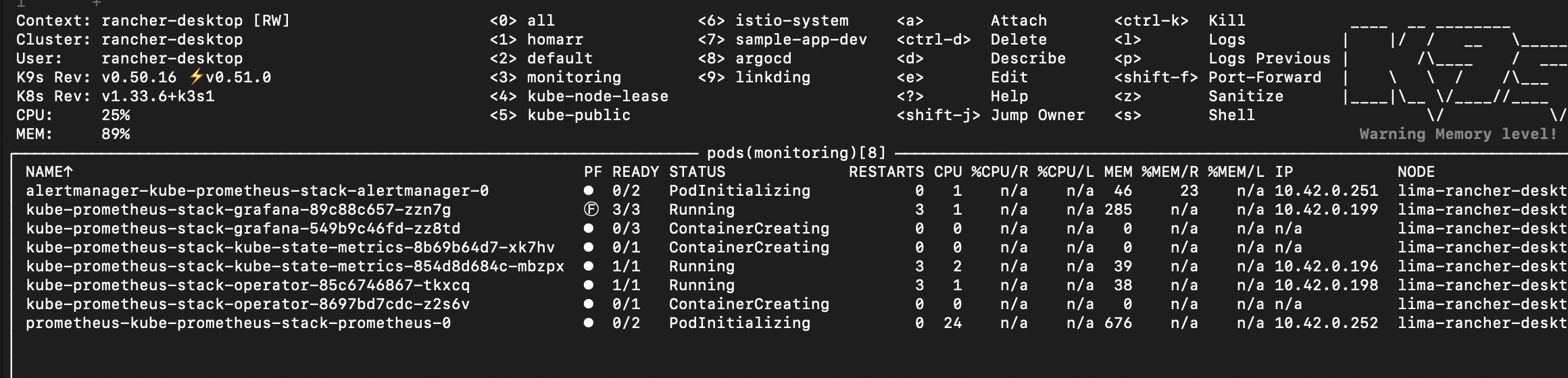 We can see the pods being applied with the new config, and the grafana dashboard will be updated with the new password.
I’ll post the continuation of this post in the next one… part 2