
Debugging Istio Sidecars with istioctl
Sometimes things go wrong in Istio and you need to figure out what exactly is happening.
This post is a collection of notes on how to debug Istio sidecars using istioctl.
istioctl proxy-status
istioctl proxy-status gives you the sync status of every sidecar/Envoy in the mesh:

istiod-c85cb789b-tg8xh in that list is istiod itself.
istiod
istiod is the unified control plane binary for Istio (since Istio 1.5 — before that it was split into separate components: Pilot, Citadel, Galley, Sidecar Injector). It’s the brain of the service mesh — it doesn’t touch data traffic directly, but it tells every Envoy proxy (sidecar or gateway) what to do.
The discovery types it serves
- CDS – clusters (upstream services)
- EDS – endpoints (pod IPs behind a service)
- LDS – listeners (ports Envoy binds/listens on)
- RDS – routes (HTTP routing/matching rules)
- There’s also SDS (secret discovery, for certs) in some setups
istiod carries four responsibilities:
- Service discovery and traffic management (“Pilot”)
- Certificate authority (“Citadel”) — acts as the mesh-internal CA, issues and rotates certs for every mTLS workload, handles SPIFFE identity for sidecars
- Configuration validation and processing (“Galley”) — validates YAML for Gateways, VirtualServices, routes, etc. as the webhook target of
kubectl apply - Sidecar injection webhook — injects the sidecar based on the
istio-injection=enabledlabel on the namespace/pod
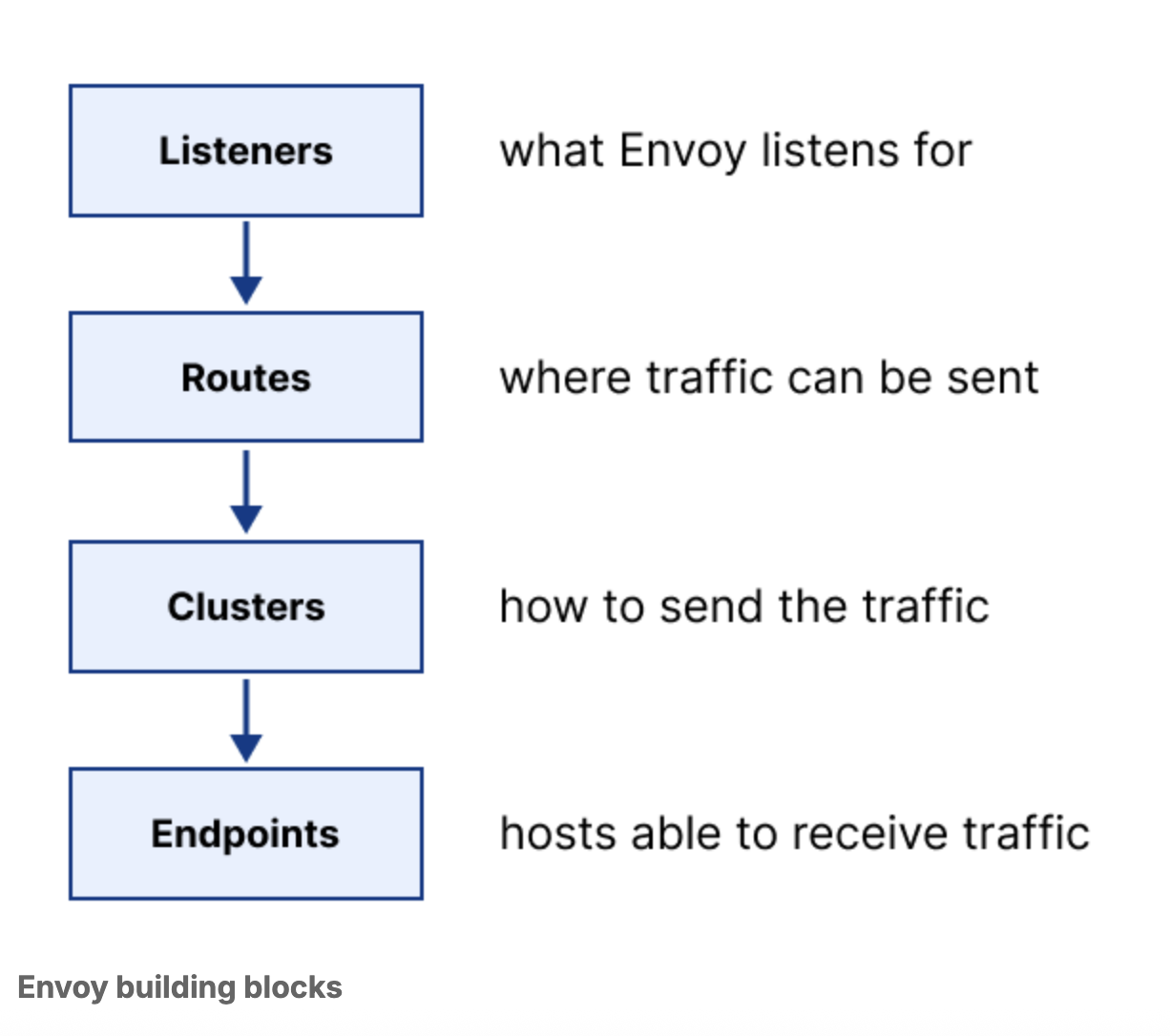
Digging into a single proxy
Beyond the mesh-wide view, istioctl proxy-config lets you inspect exactly what one Envoy sidecar knows.
Target a pod’s routes:
% istioctl proxy-config routes linkding-688b8c4864-vcrsk.linkding | grep linkding
linkding.linkding.svc.cluster.local:9090 linkding.linkding.svc.cluster.local:9090 * /*
Target a specific FQDN’s cluster:
% istioctl proxy-config cluster linkding-688b8c4864-vcrsk.linkding \
    --fqdn linkding.linkding.svc.cluster.local

SERVICE FQDN                            PORT     SUBSET     DIRECTION     TYPE     DESTINATION RULE
linkding.linkding.svc.cluster.local     9090     -          outbound      EDS
Target the endpoint behind that cluster:
% istioctl proxy-config endpoints linkding-688b8c4864-vcrsk.linkding --cluster "outbound|9090||linkding.linkding.svc.cluster.local"

ENDPOINT             STATUS      OUTLIER CHECK     CLUSTER
10.42.0.137:9090     HEALTHY     OK                outbound|9090||linkding.linkding.svc.cluster.local
And if you want the full picture, print the route config as JSON:
% istioctl proxy-config routes linkding-688b8c4864-vcrsk.linkding --name linkding.linkding.svc.cluster.local:9090 -o json
[
    {
        "name": "linkding.linkding.svc.cluster.local:9090",
        "virtualHosts": [
            {
                "name": "linkding.linkding.svc.cluster.local:9090",
                "domains": [
                    "*"
                ],
                "routes": [
                    {
                        "name": "default",
                        "match": {
                            "prefix": "/"
                        },
                        "route": {
                            "cluster": "outbound|9090||linkding.linkding.svc.cluster.local",
                            "timeout": "0s",
                            "retryPolicy": {
                                "retryOn": "connect-failure,refused-stream,unavailable,cancelled,retriable-status-codes",
                                "numRetries": 2,
                                "retryHostPredicate": [
                                    {
                                        "name": "envoy.retry_host_predicates.previous_hosts",
                                        "typedConfig": {
                                            "@type": "type.googleapis.com/envoy.extensions.retry.host.previous_hosts.v3.PreviousHostsPredicate"
                                        }
                                    }
                                ],
                                "hostSelectionRetryMaxAttempts": "5"
                            },
                            "maxGrpcTimeout": "0s"
                        },
                        "decorator": {
                            "operation": "linkding.linkding.svc.cluster.local:9090/*"
                        }
                    }
                ],
                "includeRequestAttemptCount": true
            }
        ],
        "validateClusters": false,
        "maxDirectResponseBodySizeBytes": 1048576,
        "ignorePortInHostMatching": true
    }
]
Put together, that’s the whole path a request takes through the mesh:
app -> redirect :15090 -> [ envoy ] -> linkding pod (10.42.0.137:9090)

[ listener 0.0.0.0:9090
    ↓
  route 9090
    ↓
  cluster outbound|9090||linkding.linkding.svc.cluster.local
    ↓
  endpoint 10.42.0.137:9090 ]
Every hop in that chain — listener, route, cluster, endpoint — is something you can pull straight out of istioctl proxy-config, which makes it a lot easier to answer “where exactly did my request go” instead of just staring at the mesh and hoping.